
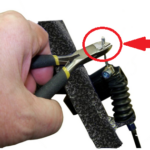
Quick answer: To replace the brake cable on a Drive 790 knee walker, clip off the cable end cover at the brake, loosen and remove the cable stop, pull off the boot and spring, and free the cable from the two under-frame guides and the tiller clip. Then turn the upper cable adjuster until the slots line up, swing the cable out of the brake handle, and reverse the whole process with the new cable. The adjuster-slot alignment is the trick that lets the cable slip in and out of the handle.
A knee walker is only as good as its brake — and since you're rolling around on it with an injured leg, a mushy or broken brake cable isn't something to put off. Good news: swapping the cable on the 790 is a straightforward job, and the one move that trips people up (getting the cable out of the brake handle) comes down to a simple slot-alignment trick. Here's the full walkthrough, plus a video if you'd rather watch it done.
Removing the Old Brake Cable
- Clip the end cover off the cable cover, down by the brake.
- Loosen the cable stop and remove it.
- Remove the boot and spring.
- Pull the brake cable through the two cable guides under the frame of the 790 knee walker.
- Remove the cable from the tiller cable clip.
- Pull the outer cable cover back a few inches.
- Turn the upper cable adjuster until all the slots align. This is the key step — when the slots line up, the cable has a clear path out of the handle.
- Swing the cable away from the brake handle and remove it.
Installing the New Brake Cable
Installation is the same steps in reverse:
- With the upper cable adjuster slots still aligned, swing the new cable into the brake handle and seat the cable end.
- Turn the adjuster back so the slots no longer line up — that locks the cable in the handle.
- Slide the outer cable cover back into place.
- Route the cable through the tiller cable clip.
- Run the cable through the two cable guides under the frame.
- Reinstall the spring and boot.
- Fit the cable stop and tighten it.
- Use the cable adjuster to set the tension, then squeeze-test the brake before you roll — it should grab firmly without dragging.
Video: Replacing the 790 Knee Walker Brake Cable
Real talk: if the new cable won't slide into or out of the brake handle, stop and check the adjuster — the slots have to be perfectly aligned for the cable to pass. Forcing it just bends the cable end. Line up the slots and it drops right in.
Frequently Asked Questions
Why won't the brake cable come out of the handle?
The upper cable adjuster slots have to be aligned first. Turn the adjuster until all the slots line up, and the cable will swing free of the handle.
Do I need special tools to replace a 790 knee walker brake cable?
No specialty tools — it's mostly hand work: clipping the end cover, loosening the cable stop, and turning the cable adjuster.
How do I set the brake tension after installing the new cable?
Use the cable adjuster to take up slack, then squeeze the brake to test. It should engage firmly without dragging on the wheel when released.
Wrapping Up
Off with the old, on with the new — and the adjuster-slot trick makes the fiddly part painless. If you need the parts, grab your 790 knee walker parts at HME Medical Shop.
— The HME Parts Team